
MVVM — What It Is and Why It Exists
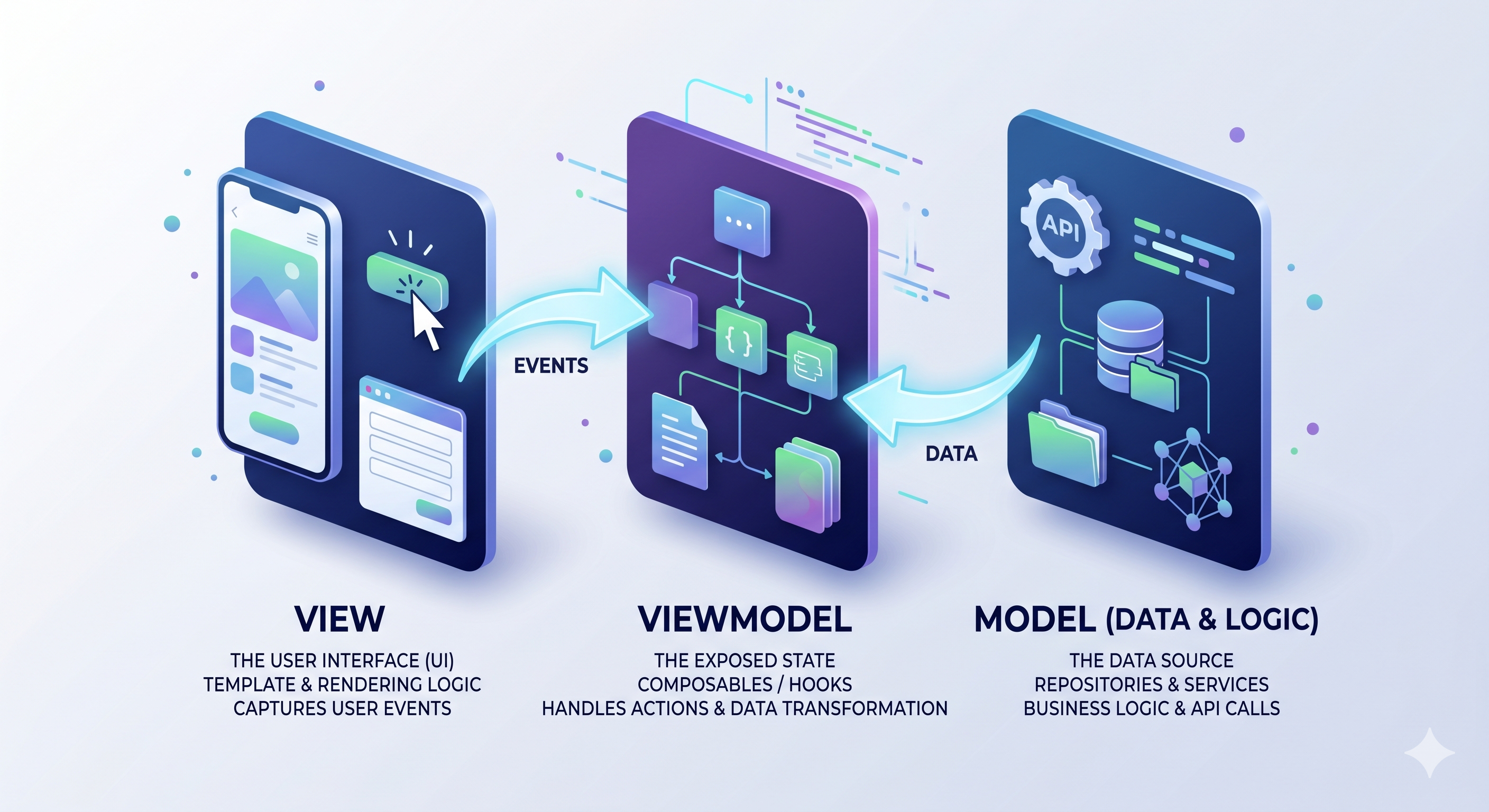
Every frontend project hits the same point. You start with a few components, everything’s clear, and then six months later you have a 600-line .vue file that fetches data, formats it, handles routing, manages loading state, and somewhere in the middle renders a button. Nobody planned it that way. It just grew.
MVVM is a pattern that exists to stop that from happening. It’s a set of rules about which layer of your code is allowed to know about which other layer. That’s all it is.
The core idea
The premise: the code that displays UI should not know where data comes from, and the code that fetches data should not know how it gets displayed. Something in between translates one world into the other.
That middle layer is the ViewModel.
The three layers
View
The View is everything the user sees and touches. In Vue, that’s your .vue template plus any logic that’s purely about rendering: conditional classes, transitions, template refs for scroll position. Nothing else.
The View doesn’t call APIs. It doesn’t format raw data. It doesn’t make routing decisions. It takes a piece of state and renders it. When the user does something, it calls a function from the ViewModel. That’s the contract.
A good View is boring. If you can read the template and immediately understand what the screen looks like without needing to understand the business domain, you got it right.
ViewModel
The ViewModel owns the state that drives the UI. It knows which repositories to call and when, and it exposes typed outputs the View can render directly.
In Vue 3, a ViewModel is a composable: a function that returns reactive state and action handlers. You call useInvestAmount() at the top of <script setup>, destructure what you need, and your template becomes a thin presentation layer.
The ViewModel:
- calls repositories to load or mutate data
- transforms raw server shapes into what the View needs
- holds UI-only state: loading flags, form errors, open/closed dialogs
- handles navigation after a successful action
- decides when to load data (the data layer doesn’t know this, and neither does the View)
What it doesn’t do: render anything, directly call an API endpoint, reach into another feature’s internals.
In practice, ViewModels split into two tiers. Domain stores are long-lived Pinia stores. They own cross-feature state like the current session or user profile, auto-initialize on login, and persist across navigation. Feature composables are scoped to a single page or flow. They compose domain stores and repositories, coordinate the steps of a user action, and get torn down when the component unmounts. If state needs to survive a route change, it belongs in a domain store. If it only lives while the user is on that screen, it’s a feature composable.
Model (Repository + Service)
The Model is everything below the ViewModel. In practice it splits into two parts.
Services are the thinnest layer. They wrap raw HTTP calls. An ApiClient that sends POST /investments/{id}/set-amount and returns a typed response. No state, no caching, no formatting. Just transport.
Repositories sit above services. They’re the single source of truth for a domain. useRepositoryInvestment holds the current state of the investment flow (loading flags, error states, fetched data) and exposes methods to mutate it. It transforms raw API shapes through formatters. It resets its state on logout.
A repository never tells the UI what to do. It doesn’t show a toast. It doesn’t navigate. It sets state.error and rethrows. Whoever called it decides what happens next.
Naming conventions
A consistent naming convention makes the layers readable at a glance: useRepository{Entity} for repositories, use{Domain} for domain stores (e.g. useSession, useProfiles), use{Feature} for feature composables (e.g. useInvestAmount), and {Feature}Page.vue for views.
Data flows one direction
UI = f(State): your template is a pure function of some state object. State changes, UI changes. MVVM is how you keep that guarantee when the app gets complex.
Data moves downward:
Repository → ViewModel → ViewEvents move upward:
View → ViewModel → RepositoryThe user taps a button. The View calls handleContinue() from the ViewModel. The ViewModel validates the form, calls investmentRepository.setAmount(...), waits for the result, then either navigates to the next step or exposes an error state. The View re-renders because the reactive state it was watching changed.
This loop is predictable. You can trace any UI change back to a specific state mutation in a specific ViewModel. You can trace any API call back to a specific user action. No global event buses, no side channels, no guessing who fired what.
Why bother with the overhead
MVVM has real ceremony for simple screens. A ref() and a fetch inside a component is faster to write and completely readable when the feature is small.
The cost shows up at month six. You need to reuse the funding validation logic in a different flow. You need to test "what happens when the wallet fetch fails." You need to extract a section of a 400-line composable because it’s become impossible to reason about.
If the layers were clean, reuse is just calling the ViewModel composable from a different View. Testing is injecting a mock repository and calling handleContinue(). Extracting logic is a mechanical refactor because you already know which layer it belongs to.
If they weren’t, you’re rewriting.
But the pattern only holds when layers stay clean, and that’s harder than it sounds.
The real downsides
Indirection. Tracing a bug from a button click to an API call means jumping through at least three files. For simple CRUD screens, that’s genuine unnecessary overhead.
Boilerplate. Every feature needs a ViewModel, a View, state types, and wiring.
The ViewModel becomes a dumping ground. Without active discipline, the "manages UI state" composable becomes the place where everything lands. Loading logic, formatters, navigation, WebSocket subscriptions: it all ends up in useEarnDetail.ts at 563 lines, and you’re back where you started with more files.
Clean layer boundaries are an assumption, not a guarantee. The pattern works when layers don’t reach past their neighbors. Getting there in an existing codebase is a migration, not a switch.
The mental model that actually helps
Think of MVVM as a permissions system:
- Views can render state and call ViewModel methods
- ViewModels can read repositories, transform data, and hold UI state
- Repositories can call services and hold server state
- Services can make HTTP requests
None of these layers skip their neighbor. A View doesn’t import a repository. A repository doesn’t render or navigate. A ViewModel doesn’t call fetch directly. When something crosses those lines, you have a maintenance problem, and eventually a production bug hiding inside it.