
Building a Multi-Step Investment Flow
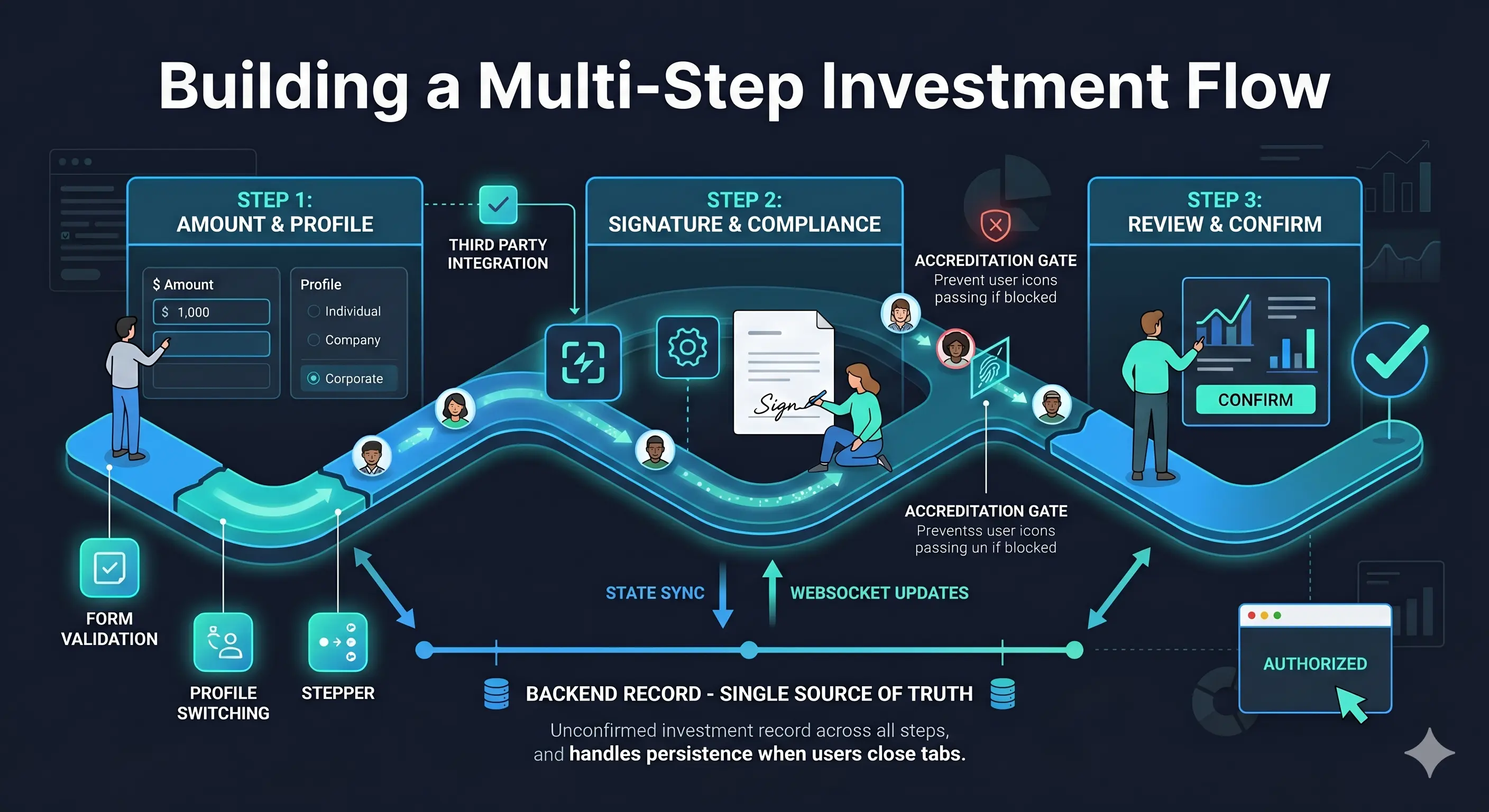
A multi-step form looks manageable until you deploy it. Then users close the tab halfway through and come back the next day. They land on a bookmarked link that skips step 1. A third-party e-signature service sits in the middle of step 2, and you don't control when it finishes. A field in step 1 changes which data is available in the same step.
The forms themselves are the easy part. This article is about the rest.
The backbone: one record across all routes
Every step in the flow depends on a single backend record: the unconfirmed investment. It's fetched on every step load via GET /auth/investment/{profileId}/unconfirmed and carries the current backend step (amount | signature | review), the share count, the selected profile, and the id that threads through every route param.
The flow doesn't persist state in localStorage, a Vuex module that survives navigation, or query params. The backend record is the source of truth for all of it. When the user closes the tab and comes back, loading the unconfirmed investment is enough to reconstruct exactly where they were.
const {
  getInvestUnconfirmedOne,  // the current in-progress investment
  setAmountState,
  setAmountOptionsState,
} = storeToRefs(investmentRepository);
This single getInvestUnconfirmedOne ref is read in every step's ViewModel, drives the stepper navigation, and is the source of the signId watch in step 2. Understanding it is understanding how the whole flow holds together.
Backend step sync
A user bookmarks a link directly to step 1. The backend says they already completed step 1 and are on "signature." Without a sync check, the user re-submits step 1 over a step 2 investment.
Every step ViewModel runs a step sync on load. Here's what it looks like in useInvestAmount:
const navigateToBackendStepIfNeeded = () => {
  const backendStepName = getInvestUnconfirmedOne.value?.step as string | undefined;
  const currentStepName = 'amount';

  if (!backendStepName || backendStepName === currentStepName) return false;

  const stepToRouteName: Record<string, string> = {
    amount: ROUTE_INVEST_AMOUNT,
    signature: ROUTE_INVEST_SIGNATURE,
    review: ROUTE_INVEST_REVIEW,
  };

  const targetRouteName = stepToRouteName[backendStepName.toLowerCase()];
  if (!targetRouteName) return false;

  router.push({ name: targetRouteName, params: { ...route.params } });
  return true;
};
The redirect happens before anything renders. If backendStepName is "signature," the user never sees step 1.
The redirect only fires if no form has been modified. If the user actually changed something (isAnyFormDirty), the ViewModel respects the user's intent and skips the redirect.
const handleContinue = async () => {
  const isValid = validateAllForms();
  if (!isValid) return;

  // Don't redirect if the user has made changes — save their work instead
  if (!isAnyFormDirty.value) {
    const redirected = navigateToBackendStepIfNeeded();
    if (redirected) return;
  }

  // ...proceed to save and navigate
};
This distinction matters. A clean load respects backend state. A dirty form respects user intent.
Step 1: three forms, one API call
The amount step looks like a single form. It's three composable sub-forms mounted in one view:
- VFormInvestAmount — share count with min/max derived from the offer
- VFormInvestOwnership — profile selector (personal account, LLC, trust, etc.)
- VFormInvestFunding — funding method (ACH, wire, wallet, crypto wallet)
Each owns its own ref, its own JSON Schema validation, its own dirty state. The ViewModel (useInvestAmount) holds all three refs:
const amountFormRef = ref<formRef | null>(null);
const ownershipFormRef = ref<formRef | null>(null);
const fundingFormRef = ref<formRef | null>(null);
When the user presses Continue, validateAllForms() triggers onValidate() on every sub-form, then finds the first invalid one and scrolls to it:
const validateAllForms = () => {
  const forms = [
    { ref: amountFormRef.value, selector: 'FormInvestAmount' },
    { ref: ownershipFormRef.value, selector: 'VFormInvestOwnership' },
    { ref: fundingFormRef.value, selector: 'InvestFormFunding' },
  ];

  forms.forEach(({ ref }) => ref.onValidate());

  let firstInvalid: { ref: formRef; selector: string } | null = null;
  for (const entry of forms) {
    if (!entry.ref.isValid) {
      if (!firstInvalid) {
        firstInvalid = entry;
        nextTick(() => entry.ref.scrollToError(entry.selector));
      }
    }
  }

  return !firstInvalid;
};
Assembling the payload is what makes the ViewModel necessary. fundingPayload is a computed that branches over four funding types and produces a different shape for each:
const fundingPayload = computed(() => {
  const fundingType = fundingFormRef.value?.model.funding_type;
  const componentData = fundingFormRef.value?.componentData;

  if (!fundingType) return undefined;

  if (fundingType === FundingTypes.ach) {
    if (componentData?.isInvalid) return undefined;
    return {
      funding_type: FundingTypes.ach,
      payment_data: {
        account_number: componentData.accountNumber,
        routing_number: componentData.routingNumber,
        account_holder_name: componentData.accountHolderName,
        account_type: componentData.accountType,
      },
    };
  }

  if (fundingType === FundingTypes.cryptoWallet) {
    return {
      funding_type: FundingTypes.cryptoWallet,
      payment_data: { wallet: getEvmWalletState.value.data?.address || '' },
    };
  }

  if (fundingType !== FundingTypes.wallet && fundingType !== FundingTypes.wire) {
    return { funding_source_id: Number(fundingType), funding_type: FundingTypes.wallet };
  }

  return { funding_type: fundingType };
});
Neither the form component nor the repository knows about the other's shape. The ViewModel is the only layer that can see both at once, which is why this computed belongs here.
buildAmountPayload() then merges all three:
const buildAmountPayload = () => ({
  amount: String(amountFormRef.value?.model.amount ?? ''),
  profile_id: ownershipFormRef.value?.model.profile_id,
  ...fundingPayload.value,
});
Profile switching mid-flow
The ownership form lets the user choose which profile to invest under: personal account, LLC, trust. Switching profiles changes which wallets are available for the funding form.
The ViewModel watches formModel.profile_id:
watch(
  () => formModel.value.profile_id,
  (newProfileId, oldProfileId) => {
    if (!newProfileId || newProfileId === oldProfileId) return;

    // Clear the funding selection — it belongs to the old profile
    if (fundingFormRef.value?.model) {
      fundingFormRef.value.model.funding_type = undefined;
    }

    // Reload wallet data for the new profile
    updateData(newProfileId);
  },
);
updateData re-fetches both the saved wallet (getWalletByProfile) and the crypto wallet (getEvmWalletByProfile) for the new profile. If the profile type doesn't support a funding method, the repository returns nothing and the funding form shows only valid options.
Without the reset, the user could switch to an LLC profile while ACH banking details from their personal account are still in the payload. The backend would reject it. The ViewModel catches this before the user ever presses Continue.
This is the kind of reactive side effect that doesn't fit in a form component; the form only knows about its own field. It doesn't fit in a repository either; the repository doesn't know about the funding selection. It belongs here because only the ViewModel can see both.
Step 2: an external service in the middle
Step 2 embeds Docuseal, a third-party e-signature service. You don't control when the user finishes signing. You can't call a function when they're done. You watch for a state change on the backend record.
The flow:
- On mount the ViewModel calls
esignRepository.setDocument()if noentity_idexists yet. This creates a signing session and returns a URL. - The View opens the Docuseal signing window:
if (signUrl.value) {
  signWindowRef.value = window.open(signUrl.value, '_blank') ?? null;
}- The ViewModel watches
signId, a computed derived fromgetInvestUnconfirmedOne.value?.signature_data?.signature_id. When the user completes signing, the backend updates the unconfirmed record via WebSocket. The watch fires:
watch(
  signId,
  (newSignId) => {
    if (!newSignId) return;
    // Close the signing window
    if (signWindowRef.value && !signWindowRef.value.closed) {
      signWindowRef.value.close();
      signWindowRef.value = null;
    }
    // Clear the temporary document state
    esignRepository.clearSetDocumentData();
    // Preload the finalized agreement so it's ready to open
    getInvestmentFiles();
  },
  { immediate: true },
);
The user never explicitly tells your app they signed. The completion signal comes from the same backend record that drives everything else in the flow. If the same record is already tracking step and profile and shares, it should track signature completion too.
This step also has an accreditation gate for RegD 506(c) offerings. The ViewModel checks the selected profile's accreditation status:
const showAccreditationButton = computed(
  () => isRegD506cOffer.value && isProfileAccreditationNewOrExpired.value,
);
If accreditation is new, expired, or pending, Continue is disabled. The user is routed to an upload flow with a redirect query param so they return to the same step after completing it:
router.push({
  name: ROUTE_ACCREDITATION_UPLOAD,
  params: { profileId: targetProfileId },
  query: { redirect: router.currentRoute.value.fullPath },
});
The signature step doesn't know about the accreditation upload flow's internals. It just reads a flag from the profile and hands navigation over.
Step 3: review and confirm
The review step is the simplest in the flow. It displays the unconfirmed investment summary (shares, price, security type, profile) and has one action:
const confirmInvest = async () => {
  await investmentRepository.setReview(slug, id, profileId);
};
Navigation happens in a $onAction listener rather than inline. This separates "the API call succeeded" from "what to do next," which makes the action easier to test:
investmentRepository.$onAction(({ name, after }) => {
  after(() => {
    if (name === 'setReview' && setReviewState.value.data?.investment) {
      router.push({
        name: ROUTE_INVEST_THANK,
        params: { id: setReviewState.value.data.investment.id },
      });
    }
  });
});
The review step doesn't re-validate or re-fetch anything. Steps 1 and 2 left the backend in a valid state. The review ViewModel trusts that and reads from the same unconfirmed record. If validation needed to happen again, it should have happened earlier.
The stepper
The visual stepper is driven by maxAvailableStep, not the active route. maxAvailableStep is computed from the backend step:
const maxAvailableStep = computed(() => {
  const backendStep = getInvestUnconfirmedOne.value?.step as InvestStepTypes | undefined;
  if (!backendStep) return props.stepNumber;

  const config = INVEST_STEPS_CONFIG[backendStep];
  return config?.step ?? props.stepNumber;
});
Steps above maxAvailableStep are disabled. The user can't click to step 3 if the backend says they're on step 1. Clicking an enabled step pushes the corresponding route via a watch:
watch(currentTab, (newTab) => {
  const stepClick = steps.find((item) => item.step === newTab);
  if (stepClick?.to.name) {
    router.push({ name: stepClick.to.name, params: routeParams.value });
  }
});
Back navigation doesn't make an API call. The user lands on a previous step, the forms re-populate from the unconfirmed investment record, and pressing Continue re-saves that step. Re-saving step 1 is idempotent: the backend accepts the same data again and stays in or returns to the correct step.
Where the hard parts are
The validation logic and form schemas are not the hard parts. The hard parts are:
State that spans routes. The backend's unconfirmed investment record is the source of truth. Fetch it on every step load. Nothing reconstructed from local state.
Knowing when an external action completes. Watch backend state, not the third-party UI. When Docuseal finishes, the backend updates, the record updates, the watch fires. The app never had to ask.
Partial resets when a contextual field changes. The profile watcher clears the funding selection before the user can submit with stale data: one watch, one reset, one reload. The cascade is explicit and local to the ViewModel.
Backend step sync that respects user intent. The isDirty guard separates "user is navigating" from "user is submitting changed data." Clean loads redirect. Dirty forms save.
The forms themselves (validation, schema, error display) are straightforward. Everything else in this list involves state that doesn't belong to a single form and doesn't belong to any single repository. It belongs to the layer that can see both.

