Custom Frontend with the Global Torque SDK
Use the SDK through one clear integration boundary
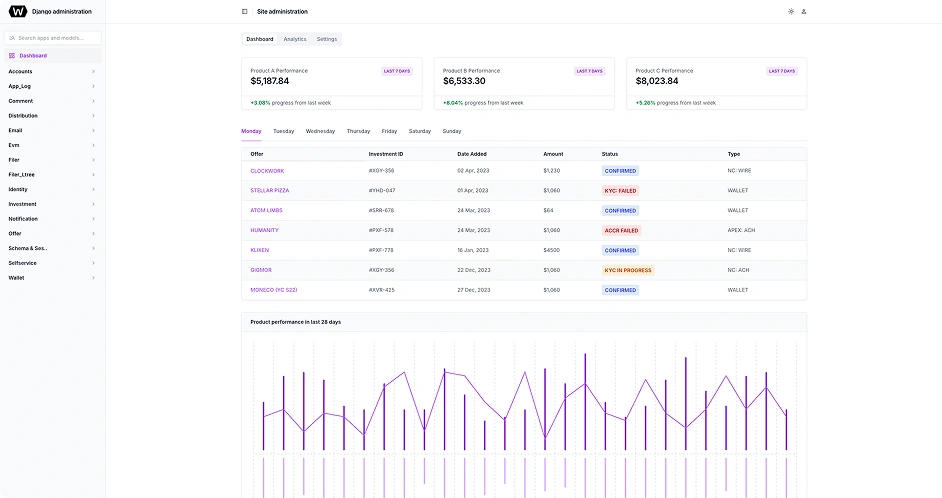
This is the same architectural direction used by Tahoe, our custom fund-manager frontend: an app-owned resource configures a Global Torque SDK service client, validates and normalizes the response, and returns application models to a ViewModel. Vue views render those models and send user intent back through commands.
What Global Torque provisions
SDK package
The SDK is an MIT-licensed public TypeScript package, currently released as 0.2.0. Global Torque supplies the approved version and upgrade path during integration onboarding. Before 1.0, breaking API changes use a new minor version and are documented in the changelog.
Service contract
You receive environment-specific HTTPS service URLs, the endpoints approved for your application, and the authentication mode for each service.
Application access
A service may require a restricted application key or be explicitly keyless. Any key delivered to browser code is public client configuration, never a server secret.
Browser policy
Cookie domain, CORS origin, redirect, and session requirements must be agreed before browser testing. A successful curl request does not prove that the frontend integration works.
Keep the SDK below your UI layer
A custom frontend should have one-way data flow. Views never call service endpoints directly, and backend response shapes never leak into templates.
- 1 Vue view
- 2 ViewModel
- 3 App resource
- 4 SDK service client
- 5 Global Torque service
Implementation guide
Step 1
Pin access and define the integration contract
Start with the approved SDK version and an endpoint inventory from Global Torque. Record the service owner, base URL, user-auth strategy, application-auth mode, response shape, and allowed operations before writing UI code.
Do not copy SDK workspace source, install an unapproved build, or infer write operations from a read endpoint. Package upgrades and new service scopes are explicit integration changes.
- Exact SDK version and supported import paths
- Development, staging, and production service URLs
- Cookie, bearer-token, typed Authorization, or anonymous user authentication
- Restricted application-key scope or explicit keyless approval
- CORS, redirect, timeout, rate-limit, and idempotency contracts
Step 2
Validate runtime configuration before mounting the app
Read deploy-specific values in one application-owned config module. Fail startup when a required URL or keyed application credential is absent. Never scatter import.meta.env reads through resources, stores, or components.
A browser application key identifies and scopes the application. It does not authenticate the user and it must not carry privileges that require a server-held secret.
src/config/integrationConfig.ts
interface IntegrationConfig { fundManagerApiUrl: string; applicationKey?: string;}function requiredHttpsUrl(name: string, value: string | undefined): string { const candidate = value?.trim(); if (!candidate) throw new Error(`${name} is required.`); const url = new URL(candidate); if (url.protocol !== 'https:') { throw new Error(`${name} must use HTTPS.`); } return url.toString().replace(/\/+$/, '');}export const integrationConfig: Readonly<IntegrationConfig> = Object.freeze({ fundManagerApiUrl: requiredHttpsUrl( 'VITE_FUND_MANAGER_URL', import.meta.env.VITE_FUND_MANAGER_URL, ), applicationKey: import.meta.env.VITE_TORQUE_APPLICATION_KEY?.trim() || undefined,});Step 3
Create one transport for the application runtime
Configure exact service origins and user authentication once. The SDK keeps application authentication separate from the user session, rejects unsafe credential overrides, applies bounded timeouts, and returns an SdkResult envelope with data, status, headers, and request ID.
The example uses cookie authentication plus a restricted application key. If Global Torque approves the service as keyless, set applicationAuth to none and omit the application key. For bearer authentication, supply a token callback instead of copying Authorization headers into each request. For another Authorization scheme, use the typed authorization strategy and return the complete header value from its resolver.
src/runtime/torqueSdk.ts
import { cookieAuth, createInvestSdkTransport,} from '@global-torque/sdk';import { integrationConfig } from '@/config/integrationConfig';if (!integrationConfig.applicationKey) { throw new Error('VITE_TORQUE_APPLICATION_KEY is required for this service.');}const transport = createInvestSdkTransport({ apiKey: integrationConfig.applicationKey, services: { fundManager: { baseUrl: integrationConfig.fundManagerApiUrl, applicationAuth: 'api-key', auth: cookieAuth({ credentials: 'include' }), }, }, timeoutMs: 10_000, retry: { maxRetries: 1, delayMs: 250, backoff: 'exponential', jitterRatio: 0.2, retryableStatuses: [429, 502, 503, 504], respectRetryAfter: true, },});export const fundManagerClient = transport.createServiceClient('fundManager');export function disposeTorqueSdk(): void { transport.dispose();}Step 4
Put endpoint calls in an app-owned resource
TypeScript types are not runtime validation. Accept unknown at the network boundary, validate the real payload, normalize legacy wrappers or field aliases, and return only the model your feature needs.
Tahoe follows this pattern for its direct SDK investor-list pilot. Its resource fixes the operation ID, query mapping, response mode, validator, retry policy, and error projection while leaving presentation state in the ViewModel.
src/features/investors/data/investorsResource.ts
import type { SdkResponseValidator, SdkServiceClient,} from '@global-torque/sdk/types';export interface InvestorSummary { id: string; displayName: string; lifecycleStatus: string;}function isRecord(value: unknown): value is Record<string, unknown> { return typeof value === 'object' && value !== null && !Array.isArray(value);}const validateInvestorList: SdkResponseValidator<InvestorSummary[]> = (payload) => { const rows = isRecord(payload) && Array.isArray(payload.data) ? payload.data : payload; if (!Array.isArray(rows)) { throw new TypeError('Investor list must be an array.'); } return rows.map((row) => { if ( !isRecord(row) || typeof row.id !== 'string' || typeof row.displayName !== 'string' || typeof row.lifecycleStatus !== 'string' ) { throw new TypeError('Investor row does not match the runtime contract.'); } return { id: row.id, displayName: row.displayName, lifecycleStatus: row.lifecycleStatus, }; });};export function createInvestorsResource(client: SdkServiceClient) { return Object.freeze({ async list(signal?: AbortSignal): Promise<InvestorSummary[]> { const result = await client.get<InvestorSummary[]>('/auth/investors', { operationId: 'FundManagerInvestorList', responseMode: 'json', responseValidator: validateInvestorList, retry: { maxRetries: 1, delayMs: 250 }, signal, }); return result.data; }, });}Step 5
Let a ViewModel own loading, errors, filtering, and cancellation
The ViewModel translates resource results into UI-ready state and exposes commands named by user intent. It also decides what happens when refreshes overlap, the route unmounts, or the SDK returns a typed failure.
Keep request IDs available for support, but show users a safe, actionable message. Authentication, authorization, validation, conflict, rate-limit, timeout, network, abort, and response-contract failures are distinct SDK outcomes.
src/features/investors/useInvestorsViewModel.ts
import { computed, onScopeDispose, readonly, ref,} from 'vue';import { InvestSdkError, SdkAbortError,} from '@global-torque/sdk';import type { InvestorSummary } from './data/investorsResource';interface InvestorsResource { list(signal?: AbortSignal): Promise<InvestorSummary[]>;}export function useInvestorsViewModel(resource: InvestorsResource) { const investors = ref<InvestorSummary[]>([]); const search = ref(''); const isLoading = ref(false); const errorMessage = ref<string | null>(null); let activeRequest: AbortController | undefined; const rows = computed(() => { const query = search.value.trim().toLowerCase(); return investors.value.filter((investor) => investor.displayName.toLowerCase().includes(query), ); }); async function refresh(): Promise<void> { activeRequest?.abort(); const request = new AbortController(); activeRequest = request; isLoading.value = true; errorMessage.value = null; try { investors.value = await resource.list(request.signal); } catch (error) { if (error instanceof SdkAbortError) return; const requestId = error instanceof InvestSdkError ? error.requestId : undefined; errorMessage.value = requestId ? `Investor data could not be loaded. Request ID: ${requestId}` : 'Investor data could not be loaded. Try again.'; } finally { if (activeRequest === request) { activeRequest = undefined; isLoading.value = false; } } } onScopeDispose(() => activeRequest?.abort()); return { search, rows, isLoading: readonly(isLoading), errorMessage: readonly(errorMessage), refresh, };}Step 6
Keep the Vue view thin and dispose owned runtime state
The route binds prepared state and calls commands. It does not know endpoint paths, authentication headers, response envelopes, retry policy, or backend field aliases.
Create the transport at application startup, inject resources into the feature boundary, and dispose the transport on application teardown, logout, tenant change, or hot-module replacement. Disposal aborts requests owned by that transport.
src/features/investors/InvestorsView.vue
<!-- InvestorsView.vue: vm comes from useInvestorsViewModel(resource). --><template> <section> <input v-model="vm.search.value" aria-label="Search investors"> <button type="button" :disabled="vm.isLoading.value" @click="vm.refresh" > <span v-text="vm.isLoading.value ? 'Loading' : 'Refresh'" /> </button> <p v-if="vm.errorMessage.value" role="alert" v-text="vm.errorMessage.value" /> <InvestorTable :rows="vm.rows.value" /> </section></template>Authentication is two separate decisions
Application access selects which service contract the frontend may call. User authentication identifies the person and determines what that person may do. Configure both explicitly.
| Layer | Supported choice | Responsibility |
|---|---|---|
| Application auth | Restricted API key or explicitly keyless | Identifies and scopes the client application for one exact service origin. |
| User auth | Cookie, bearer token, typed Authorization, or none | Carries the signed-in user session independently of application access. |
| Authorization | Server-side roles, tenant or site scope, and resource permissions | Decides whether the authenticated user may perform the requested operation. |
Map SDK failures deliberately
- SDK_AUTHENTICATION_FAILED
- Refresh or restart the user session and preserve the request ID for support.
- SDK_AUTHORIZATION_FAILED
- Show that the action is unavailable; do not repeat the request with broader client credentials.
- SDK_VALIDATION_FAILED
- Map approved field errors to the form; treat unknown response details as untrusted.
- SDK_CONFLICT
- Refresh the affected resource state and ask the user to resolve the conflict before retrying.
- SDK_RATE_LIMITED
- Respect Retry-After when present and prevent manual refresh loops.
- SDK_NETWORK_FAILED or SDK_TIMEOUT
- Keep existing UI state when safe and offer an explicit retry.
- SDK_RESPONSE_VALIDATION_FAILED
- Fail closed, report the operation and request ID, and fix the contract mismatch before rendering the data.
- SDK_ABORTED
- Treat route cleanup or replaced requests as normal cancellation, not a user-facing error.
Production readiness checklist
- SDK version and service operations are approved and pinned.
- Every service uses an exact HTTPS origin and the agreed base path.
- Browser application keys are restricted, environment-specific client configuration and never server secrets.
- Cookie, bearer, typed Authorization, or anonymous user authentication is selected per service.
- CORS, credentials, redirects, and cookies are verified from the real browser origin.
- Successful responses cross a synchronous runtime validator before feature state changes.
- Only safe GET, HEAD, and OPTIONS reads are retried automatically.
- Mutations are not retried unless the backend has a documented replay contract.
- An idempotency key is used only where the server contract explicitly supports it.
- ViewModels expose loading, disabled, error, success, overlap, cancellation, and reset behavior.
- Resource, ViewModel, and representative browser-flow tests cover the integration.
- The SDK transport is disposed when its application or session lifetime ends.
Ready to build with the SDK?
The Torque SDK product overview explains the product boundary, available capabilities, starter evidence and integration choices. Return here for the implementation contract and code examples.