Building a Zero-Trust Private Network
Secure VPN Access Through Cloudflare Tunnels
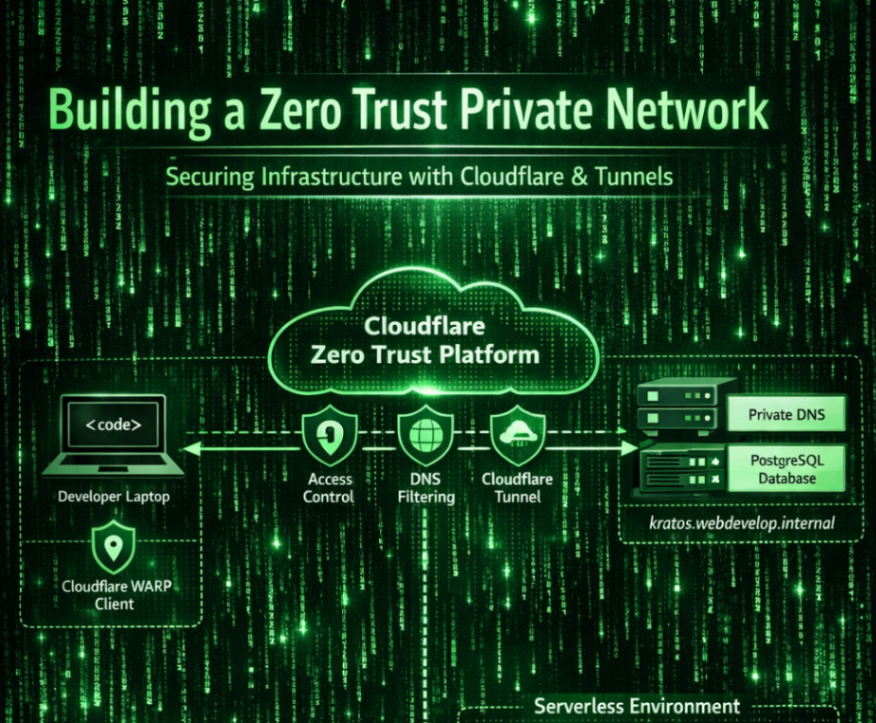
Modern infrastructure rarely lives in one place. Applications run in serverless environments, databases live on dedicated servers, and developers access systems from laptops around the world. Traditional VPN-based networking struggles with this model because it assumes static machines and trusted internal networks.
A Zero Trust architecture solves this by assuming that nothing is trusted by default - every request must be authenticated, authorized, and encrypted. Cloudflare Zero Trust provides a practical framework for implementing this model by combining private networking, identity-aware access, DNS routing, and service authentication.
This article explains how a Zero Trust private network can be built using Cloudflare WARP, Cloudflare Tunnels, private DNS with dnsmasq, and machine-to-machine authentication using service tokens.
Zero Trust Networking Architecture
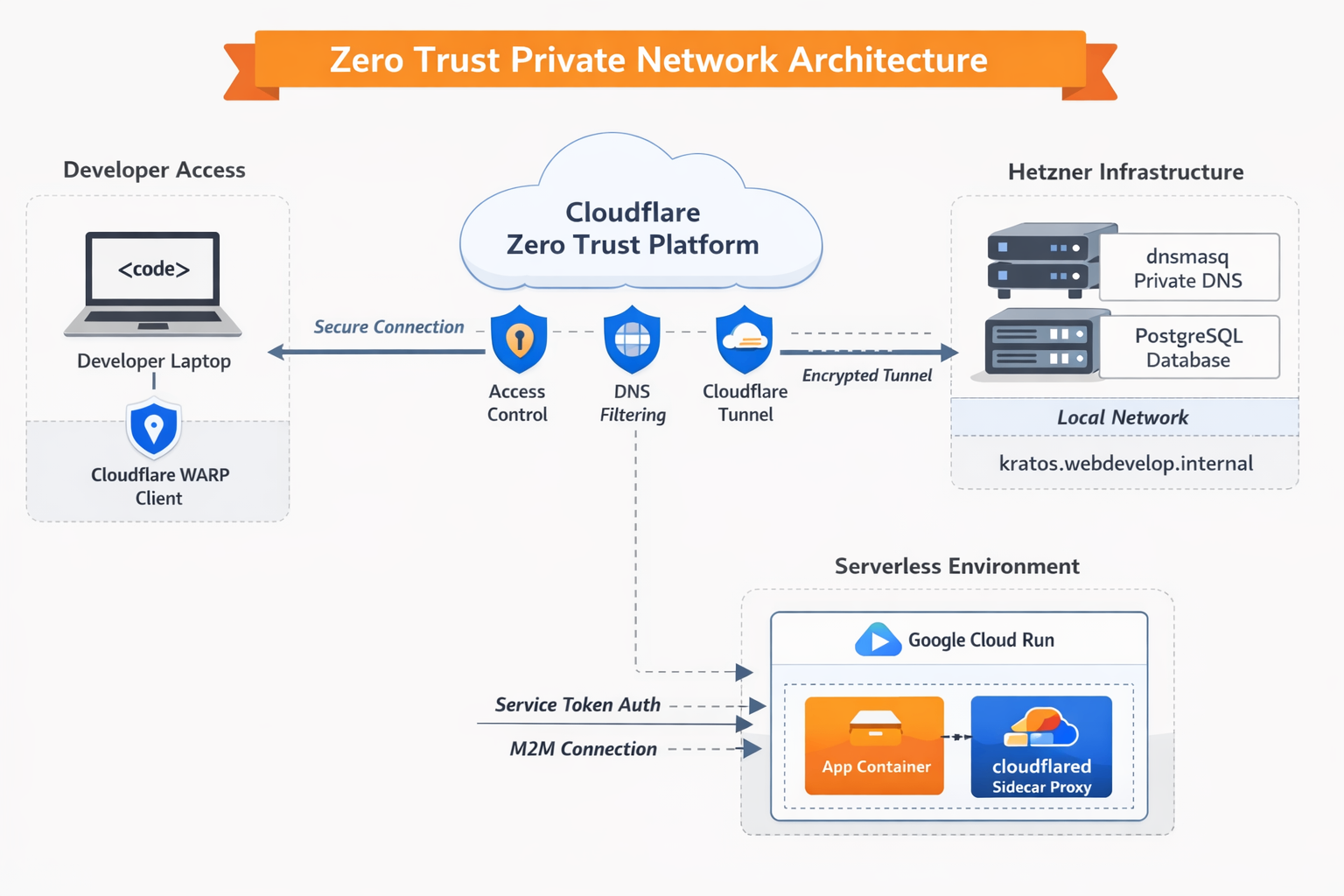
The architecture combines several components:
- Cloudflare WARP for secure device connectivity
- Cloudflare Tunnel (
cloudflared) for exposing private services without opening firewall ports - Private DNS resolution using
dnsmasq - Service authentication tokens for machine-to-machine access
- Sidecar proxies for serverless environments like Cloud Run
Together, these components create a secure overlay network where services communicate without being exposed to the public internet.
The complete Zero Trust network includes:
Developer Laptop
      ↓
Cloudflare WARP
      ↓
Cloudflare Zero Trust
      ↓
Cloudflare Tunnel
      ↓
Hetzner Infrastructure
      ↓
Private Services
   - PostgreSQL
   - Identity Services
   - Internal APIs
Serverless applications communicate through:
Cloud Run
   ↓
cloudflared Sidecar
   ↓
Cloudflare Access
   ↓
Private Database
Private DNS for Internal Services
A key challenge in private infrastructure is internal service discovery. Developers want to access services using human-readable hostnames such as:
kratos.webdevelop.internalrather than remembering IP addresses.
To achieve this, a lightweight DNS server such as dnsmasq can run on a private infrastructure node. This DNS service maps internal domains to local services.
Example resolution:
kratos.webdevelop.internal → 127.0.0.1When a developer connects through Cloudflare WARP, their DNS requests can be securely forwarded to the private DNS server.
Install dnsmasq and create simple configuration file
❯ cat /etc/dnsmasq.d/cloudflare_internal.conf
# Listen on both localhost and your server's actual IP
interface=lo
listen-address=127.0.0.1,10.254.254.254
bind-dynamic

# Automatically resolve your internal domains to the target IP
address=/webdevelop.internal/10.130.0.1
address=/kratos.webdevelop.internal/10.130.0.100

# Standard forwarding rules
domain-needed
bogus-priv

server=1.1.1.1
server=8.8.8.8
Cloudflare Local Domain Fallback
Cloudflare WARP allows configuring Local Domain Fallback, which routes DNS queries for specific domains to internal DNS servers.
Configuration steps:
- Open the Cloudflare Zero Trust Dashboard
- Navigate to
Settings → WARP Client → Device Settings → Default Profile - Locate Local Domain Fallback
- Add the domain:
webdevelop.internal- Specify the private IP address of the server running
dnsmasq.
Now when a developer types:
kratos.webdevelop.internalthe DNS query is securely tunneled through Cloudflare to the private infrastructure.
The result is instant, private service discovery without exposing any internal DNS infrastructure to the public internet.
Secure Database Access Through Cloudflare Tunnels
Databases are among the most sensitive services in any system. Traditionally they are protected by:
- VPNs
- firewalls
- private subnets
However, these methods still expose ports to networks that might be compromised.
Cloudflare Tunnels allow services like PostgreSQL to be accessed without opening any inbound firewall ports.
Instead of exposing the database directly, a small daemon called cloudflared establishes an outbound encrypted connection to Cloudflare’s edge network.
Example configuration:
db.webdevelop.com → localhost:5432Although the hostname appears public, it is completely inaccessible without authentication.
Locking Down Access with Service Tokens
Zero Trust requires strong identity validation for every request.
For machine-to-machine communication, Cloudflare provides Service Tokens, which act like secure credentials.
A service token consists of:
Client ID
Client Secret
These credentials must be included in every request.
Access Policy
An application policy can be configured so that only requests presenting the correct service token are allowed.
Example policy:
Application: db.webdevelop.com
Access Rule: Service Token
Allowed Token: Cloud Run DB Access
With this configuration:
- the database endpoint is technically reachable
- but every request without the correct token is rejected
This eliminates unauthorized access even if the hostname becomes known.
Connecting Serverless Applications
Serverless platforms introduce another networking challenge.
Services such as Google Cloud Run dynamically start and stop instances. Because of this, you cannot install persistent networking tools like VPN clients or WARP agents.
Instead, the architecture shifts to Machine-to-Machine (M2M) networking.
This is achieved by embedding a cloudflared proxy inside the application environment.
Using Sidecar Containers for Secure Connectivity
Cloud Run supports sidecar containers, meaning multiple containers can run within the same instance.
This allows separating responsibilities:
Container 1 – Application
Your web service
API server
Background worker
Container 2 – Cloudflare Proxy
cloudflared
Handles secure tunnel communication
Injects service authentication
The application communicates locally with the proxy, while the proxy securely connects to the remote service.
Architecture flow:
Cloud Run App
      ↓
Local Sidecar Proxy (cloudflared)
      ↓
Cloudflare Zero Trust Edge
      ↓
Cloudflare Tunnel
      ↓
Hetzner Server
      ↓
PostgreSQL (localhost:5432)
This model ensures:
- no database port is exposed
- all traffic is encrypted
- access requires a service token
- identity policies are enforced
Example on how to run two contains for google cloud run
gcloud run deploy {{ worker_name }}
    --platform=managed
    --region="{{ GCP_REGION }}"
    --no-allow-unauthenticated
    --service-account="cloud-func-storage-access@{{ GCP_PROJECT_ID }}.iam.gserviceaccount.com"
    --project="{{ GCP_PROJECT_ID }}"
    --container="{{ worker_name }}"
      --image="{{ GCP_REGION }}-docker.pkg.dev/{{ GCP_PROJECT_ID }}/{{ COMPANY_NAME }}/{{ service_name }}:{{ docker_image_version }}"
      --env-vars-file="/tmp/cloud_run_env.yaml"
      --memory="128Mi"
      --port="8080"
      --startup-probe="httpGet.path=/healthcheck,httpGet.port=8080,initialDelaySeconds=10,failureThreshold=10,timeoutSeconds=2,periodSeconds=5"
      --liveness-probe="httpGet.path=/healthcheck,httpGet.port=8080,initialDelaySeconds=0,periodSeconds=10,failureThreshold=3,timeoutSeconds=5"
      --command="/app/worker"
      --depends-on="cloudflared-sidecar"
    --container="cloudflared-sidecar"
      --image="cloudflare/cloudflared:latest"
      --args="access,tcp,--hostname,db.webdevelop.com,--url,0.0.0.0:{{ DB_PORT }},--id,{{ cf_service_token_id }},--secret,{{ cf_service_token_secret }}"
      --set-env-vars="TUNNEL_CLIENT_ID={{ cf_service_token_id }},TUNNEL_CLIENT_SECRET={{ cf_service_token_secret }}"
      --startup-probe="tcpSocket.port={{ DB_PORT }},initialDelaySeconds=2,failureThreshold=15,timeoutSeconds=1,periodSeconds=2"
Benefits of a Zero Trust Private Network
No Open Firewall Ports
Services remain completely private. Connections originate from the infrastructure outward, preventing inbound attack vectors.
Identity-Based Access
Access policies enforce authentication at the network layer rather than relying solely on application security.
Works with Dynamic Infrastructure
Serverless environments, containers, and autoscaling systems integrate seamlessly.
Secure Developer Access
Developers can securely access internal services through WARP without needing traditional VPNs.
Simplified Networking
Instead of managing complex VPC peering or private networks across providers, Cloudflare acts as a secure global network overlay.
Conclusion
Zero Trust networking fundamentally changes how private infrastructure is secured. Instead of protecting a trusted internal network perimeter, every connection is individually authenticated and authorized.
By combining Cloudflare WARP, private DNS resolution, Cloudflare Tunnels, and service tokens, organizations can build a secure private network that works seamlessly across developer devices, dedicated servers, and serverless platforms.
The result is a highly secure, scalable architecture where services remain private, identities are verified, and infrastructure can scale dynamically without compromising security.