Authorization - Sessions, Kratos, and Route Guards
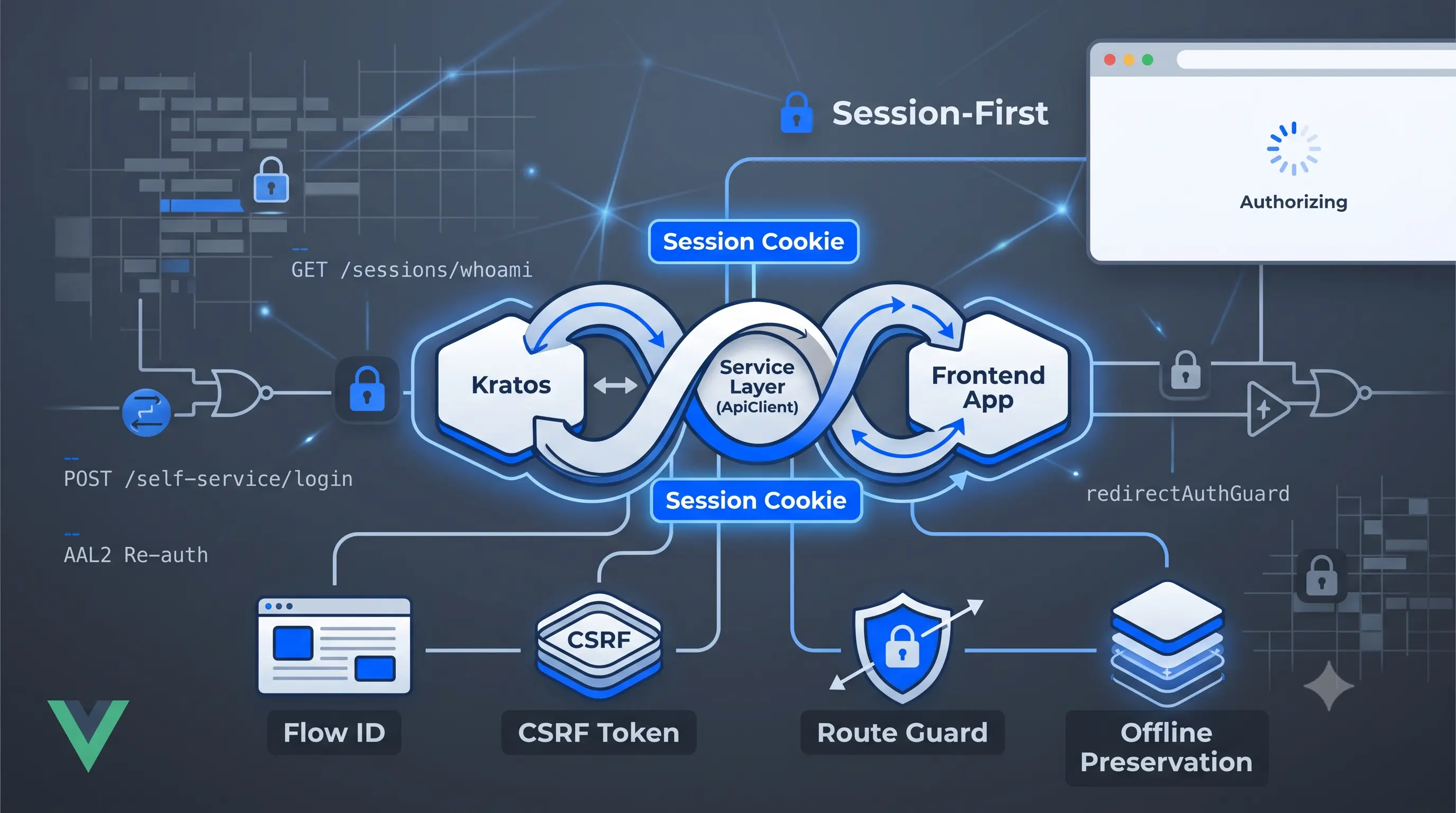
There's no refresh token logic in this codebase. No axios interceptor that catches 401s, queues up pending requests, and replays them after a token refresh. That's by design. Ory Kratos handles identity. The frontend's job is simpler: fetch the session, store it, and redirect when it's gone.
This article traces the auth flow from form submit to cookie, then through the route guard and the edge case nobody thinks about until a user on a train tries to open the app.
The three layers
Same pattern as the rest of the codebase. Service → Repository → Store.
Service (ApiClient) talks to Kratos. The auth repository points it at KRATOS_URL, not the main API. Two calls matter most:
// GET /sessions/whoami — is this cookie still active?
const getSession = async (): Promise<ISession | null> => {
  try {
    const result = await withActionState(getSessionState, async () => {
      const response = await apiClient.get<ISession>('/sessions/whoami');
      return response.data;
    });
    return result ?? null;
  } catch (err) {
    if (err instanceof APIError && err.data.statusCode === 401) {
      getSessionState.value.data = undefined;
      getSessionState.value.error = null;
      return null;
    }
    throw err;
  }
};

// POST /self-service/login?flow={flowId} — submit credentials
const setLogin = async (flowId: string, body: object) =>
  withActionState(setLoginState, async () => {
    const response = await apiClient.post(`/self-service/login?flow=${flowId}`, body);
    return response.data;
  });
getSession treats a 401 as a clean null, not an error. A 401 from Kratos means "no active session" not a crash. Everything else rethrows.
Repository (useRepositoryAuth) wraps these calls in ActionState<T> refs, the same loading/error/data pattern used everywhere else. Nothing new here.
Store (useLoginStore) is where the form lives: validation, payload building, redirect logic.
The login flow
Kratos requires a flow ID before it'll accept credentials. The flow ID comes with a CSRF token. You can't skip it.
loginPasswordHandler does this in order:
const loginPasswordHandler = async () => {
  if (!validateForm()) return;

  isLoading.value = true;
  try {
    // 1. Get a fresh flow — this also fetches the CSRF token
    const flowData = await authRepository.getAuthFlow(SELFSERVICE.login);
    oryResponseHandling(flowData);
    if (getAuthFlowState.value.error) {
      isLoading.value = false;
      return;
    }

    // 2. Build the payload with the CSRF token baked in
    const loginRequestBody = buildPasswordLoginRequestBody();
    await authRepository.setLogin(authRepository.flowId.value, loginRequestBody);

    if (setLoginState.value.error) {
      void trackLoginEvent(400, loginRequestBody);
      isLoading.value = false;
      return;
    }
  } catch (error) {
    await oryErrorHandling(error as any, 'login', resetLoginFlow, 'Failed to login');
  } finally {
    isLoading.value = false;
  }

  // 3. On success, write session + fire HubSpot + navigate
  if (setLoginState.value.data?.session) {
    userSessionStore.updateSession(setLoginState.value.data.session);
    await handleLoginSuccess();
  }
};
buildPasswordLoginRequestBody includes the CSRF token from the repository:
const buildPasswordLoginRequestBody = () => ({
  identifier: model.email,
  password: model.password,
  method: 'password' as const,
  csrf_token: authRepository.csrfToken.value,
});
The social login handler takes the same path, but uses method: 'oidc' and a provider string instead of email/password.
Session storage
On success, updateSession writes the session to a cookie:
const updateSession = (session: ISession) => {
  userSession.value = session;
  isSessionHydrated.value = true;
  cookies.set(
    'session',
    session,
    cookiesOptions(new Date(session?.expires_at)),
  );
};
The cookie expiration comes from Kratos: session.expires_at is whatever Kratos decided when it issued the session. The frontend doesn't pick an expiry; it mirrors what the server said.
syncSessionFromCookies runs on startup to hydrate the store from an existing cookie without an API call. If there's nothing there, isSessionHydrated is still set to true; the app needs to know the check happened, even when the result was empty.
The route guard
redirectAuthGuard runs on every navigation. It has two main paths.
User not logged in:
if (!userLoggedIn.value) {
  const session = (await useRepositoryAuth().getSession()) as ISession | null;

  if (session?.active) {
    await userSessionStore.updateSession(session);
    await profilesStore.init({ force: true });
    return;
  }

  if (to.meta.requiresAuth) {
    await redirectToSignin();
  }
  return;
}
The store says not logged in, but that might mean the cookie was set by a previous tab or the page was refreshed. The guard fetches /sessions/whoami to find out. If the session is active, update the store and continue. If not, redirect only if the route requires auth.
User appears logged in:
if (userLoggedIn.value && userSession.value) {
  const session = (await useRepositoryAuth().getSession()) as ISession | null;

  if (!session?.active) {
    await resetAllData();
    if (to.meta.requiresAuth) {
      await redirectToSignin();
    }
    return;
  }

  if (session && session.id !== userSession.value?.id) {
    await userSessionStore.updateSession(session);
    await profilesStore.init({ force: true });
  }
}
The store says logged in, but the session might have been revoked elsewhere: by an admin, by another device, by a Kratos policy. The guard checks every navigation. If the server disagrees, resetAllData() clears everything and redirects if needed.
The ID comparison handles the case where the session renewed: update the store rather than forcing a logout.
Offline session preservation
The guard calls getSession() on every navigation. If the user has no network, getSession() throws a network error. Without special handling, every navigation offline would sign the user out.
shouldPreserveOfflineSession catches this:
export const shouldPreserveOfflineSession = (
  session?: ISession | null,
  error?: unknown,
) => {
  if (!hasActiveLocalSession(session)) {
    return false;
  }

  if (isBrowserOffline()) {
    return true;
  }

  if (error instanceof APIError || !(error instanceof Error)) {
    return false;
  }

  const errorMessage = error.message.toLowerCase();
  return OFFLINE_ERROR_MESSAGES.some((candidate) => errorMessage.includes(candidate));
};
Two conditions. navigator.onLine === false is the clean case; the browser knows. The string matching on error messages ('failed to fetch', 'load failed', etc.) is the fallback for browsers that don't update navigator.onLine reliably.
The guard checks it in both the happy path and the catch:
if (shouldPreserveOfflineSession(getLocalSession())) {
  return;
}
// ...
} catch (error) {
  if (shouldPreserveOfflineSession(getLocalSession(), error)) {
    return; // network error, but session was valid — let them through
  }
  await oryErrorHandling(error as any, 'browser', () => {}, 'Auth guard');
  await resetAllData();
}
A valid local session plus a network error: trust the cookie, let the navigation go through.
AAL2: re-authentication
Kratos can require a second factor mid-session. When it does, the login endpoint returns requested_aal: 'aal2' instead of a session.
onMountedHandler checks this when the login page mounts with a ?flow= query param:
const onMountedHandler = async () => {
  const currentFlowId = getQueryParam('flow');

  if (currentFlowId) {
    const data = await authRepository.getLogin(currentFlowId);
    oryResponseHandling(data);
    if (getLoginState.value.data?.requested_aal === 'aal2') {
      navigateWithQueryParams(urlAuthenticator);
    }
    return;
  }
};
The user lands on the login page with a flow that already has credentials validated at AAL1. The check detects AAL2 is required and redirects to the authenticator page (TOTP or WebAuthn) without showing the password form again.