Practical Example
Start With Backend Architecture
What the repo gives you
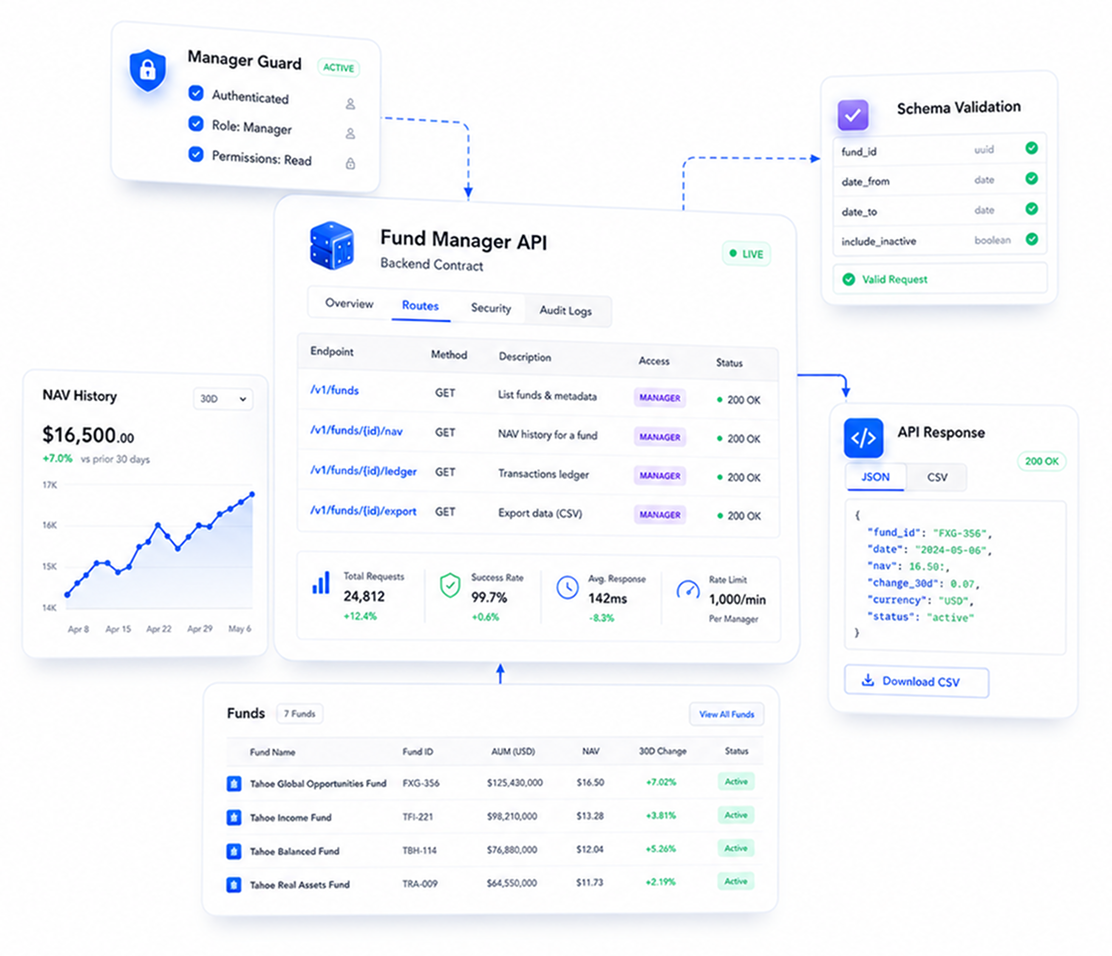
A small aiohttp service with environment config, route registration, Marshmallow validation, an asyncpg-backed fund model, JSON responses, and CSV export behavior.
What to copy
Copy the architecture, not only the endpoint names: config stays external, routes declare the contract, schemas validate writes, models own persistence, and views coordinate behavior.
Where to extend
Add custom backend behavior by creating a focused route, schema, model helper, and view handler. Keep authentication, tenant scoping, migrations, and observability explicit before production.
From Example Repository To Backend Component
Build the backend component by following the public practical-example service architecture. The point is not only to add an endpoint; it is to keep runtime config, routing, validation, persistence, view behavior, and response formatting in predictable places.
Step 1
Clone and run the public backend
Start with global-torque/practical-example. Create the local database, install Python dependencies, copy the environment file, and run the API before adding your custom backend behavior.
git clone https://github.com/global-torque/practical-example.gitcd practical-examplecreatedb torque_practical_examplepython -m venv .venv. .venv/bin/activatepython -m pip install -r requirements.txt -r requirements-dev.txtcp .env.example .env./make.sh run-devStep 2
Keep runtime settings in config
Put host, port, database, logging, OpenAPI, middleware, and source identity in env-backed config. This keeps local development, staging, and production behavior configurable without changing endpoint code.
# app/config.pyimport environenviron.Env.read_env()env = environ.Env()config = { "source": "torque-practical-example", "web_run": { "host": env.str("HOST", default="0.0.0.0"), "port": env.int("PORT", default=8080), }, "postgres": { "database": env.str("DB_DATABASE", default="torque_practical_example"), "user": env.str("DB_USER", default="postgres"), "password": env.str("DB_PASSWORD", default="postgres"), "host": env.str("DB_HOST", default="localhost"), "port": env.int("DB_PORT", default=5432), "min_size": env.int("DB_MIN_CONNECTIONS", default=1), "max_size": env.int("DB_MAX_CONNECTIONS", default=5), }, "middlewares": [ "aiohttp_boilerplate.middleware.defaults.cross_origin_rules", "aiohttp_boilerplate.middleware.logger_to_request.logger_to_request", "aiohttp_boilerplate.middleware.x_request_id.x_request_id", ],}Step 3
Register routes as the public contract
Add a path, handler class, and method tuple to the route table. The example also records allowed methods so OPTIONS responses and real handlers stay aligned.
# app/routes.pyfrom aiohttp import webfrom app.views.funds import FundDetail, FundExport, FundListCreateROUTES: tuple[tuple[str, type[web.View], tuple[str, ...]], ...] = ( ("/v1.0/funds", FundListCreate, ("GET", "POST")), ("/v1.0/funds/export", FundExport, ("GET",)), ("/v1.0/funds/{slug}", FundDetail, ("GET",)),)def setup_routes(app: web.Application) -> None: route_methods: dict[str, tuple[str, ...]] = {} for path, handler, methods in ROUTES: allowed_methods = ("OPTIONS", *methods) route_methods[path] = allowed_methods app.router.add_route("OPTIONS", path, handler) for method in methods: app.router.add_route(method, path, handler) app.conf["route_methods"] = route_methodsStep 4
Validate request payloads before behavior
Use Marshmallow schemas for accepted fields, request aliases, numeric precision, enum values, and cross-field checks. Handler code should receive validated data, not raw JSON guesses.
# app/schemas.pyfrom decimal import Decimalfrom typing import Anyfrom marshmallow import Schema, ValidationError, fields, validate, validates_schemaclass FundCreate(Schema): name = fields.String(required=True, validate=validate.Length(min=1, max=160)) slug = fields.String( required=True, validate=[ validate.Length(min=1, max=180), validate.Regexp( r"^[a-z0-9]+(?:-[a-z0-9]+)*$", error="Use lowercase letters, numbers, and single hyphens.", ), ], ) status = fields.String( load_default="draft", validate=validate.OneOf(["draft", "open", "closed", "archived"]), ) target_raise = fields.Decimal(required=True, places=2, data_key="targetRaise") capacity_limit = fields.Decimal(required=True, places=2, data_key="capacityLimit") current_nav = fields.Decimal(required=True, places=4, data_key="currentNav") total_shares = fields.Decimal(required=True, places=18, data_key="totalShares") show_on_dashboard = fields.Boolean(load_default=True, data_key="showOnDashboard") @validates_schema def validate_amounts(self, data: dict[str, Any], **_: Any) -> None: errors: dict[str, list[str]] = {} for key in ("target_raise", "capacity_limit", "current_nav"): value = data.get(key) if isinstance(value, Decimal) and value < 0: errors[key] = ["Must be greater than or equal to 0."] total_shares = data.get("total_shares") if isinstance(total_shares, Decimal) and total_shares <= 0: errors["total_shares"] = ["Must be greater than 0."] target_raise = data.get("target_raise") capacity_limit = data.get("capacity_limit") if ( isinstance(target_raise, Decimal) and isinstance(capacity_limit, Decimal) and capacity_limit < target_raise ): errors["capacity_limit"] = ["Must be greater than or equal to targetRaise."] if errors: raise ValidationError(errors)Step 5
Keep persistence behind model helpers
Use the model manager for table ownership and small database helpers for shared SQL behavior. That keeps connection handling, SQL execution, and JSONB parsing out of every view handler.
# app/models.pyfrom aiohttp_boilerplate.models import Managerclass Fund(Manager): __table__ = "funds"# app/db.pyimport jsonfrom typing import Anyimport asyncpgfrom aiohttp_boilerplate.sql import SQLfrom aiohttp_boilerplate.sql.consts import FETCHROWasync def fetchrow( pool: asyncpg.Pool, query: str, params: dict[str, Any],) -> asyncpg.Record | None: sql = SQL(table=None, db_pool=pool) return await sql.execute(query, params, FETCHROW)def parse_jsonb(value: Any) -> dict[str, Any]: if value is None: return {} if isinstance(value, str): loaded = json.loads(value) return loaded if isinstance(loaded, dict) else {} if isinstance(value, dict): return value return {}Step 6
Write explicit view and response code
View handlers should parse input, call schemas, use the model boundary, catch expected errors, and return stable JSON or CSV shapes. Before production, add auth, tenant scoping, migrations, observability, and operational controls.
# app/views/funds.pyclass FundListCreate(BaseFundView): async def get(self) -> web.Response: limit_error, limit = parse_int_query( self.request.query.get("limit"), "limit", 50, 100, ) if limit_error is not None: return json_error(limit_error) where, params = build_search_filter(self.request.query.get("search")) funds = self.get_fund_model(is_list=True) rows = await funds.sql.select( fields=FUND_COLUMNS, where=where, order="created_at DESC, id DESC", limit=limit, params=params, many=True, ) return json_response({ "data": [fund_to_response(row, self.source) for row in rows], "source": self.source, }) async def post(self) -> web.Response: try: payload = await self.request.json() data = FundCreate().load(payload) except json.JSONDecodeError: return json_error("Request body must be valid JSON.") except ValidationError as exc: return json_response( {"error": "Invalid request payload.", "details": exc.messages}, status=400, ) fund_data = { "name": data["name"], "slug": data["slug"].lower(), "description": data.get("description") or "", "target_raise": data["target_raise"], "total_shares": data["total_shares"], "current_nav": data["current_nav"], "status": data["status"], "data": { "torque": { "capacityLimit": json_number(data["capacity_limit"]), "showOnDashboard": data["show_on_dashboard"], }, }, } fund = await self.get_fund_model().insert(data=fund_data) return json_response(fund_to_response(fund.data, self.source), status=201)# app/views/funds.pydef fund_to_response(row: asyncpg.Record | dict[str, Any], source: str) -> dict[str, Any]: data = parse_jsonb(row["data"]) torque = data.get("torque", {}) if isinstance(data, dict) else {} nav_history = torque.get("navHistory", []) return { "id": row["id"], "name": row["name"], "slug": row["slug"], "description": row["description"], "status": row["status"], "targetRaise": json_number(row["target_raise"]), "capacityLimit": torque.get("capacityLimit"), "currentNav": json_number(row["current_nav"]), "navDate": latest_nav_date(nav_history) or row["updated_at"].date().isoformat(), "totalShares": row["total_shares"], "showOnDashboard": torque.get("showOnDashboard", False), "source": source, }def csv_response( filename: str, fieldnames: tuple[str, ...], rows: list[dict[str, Any]],) -> web.Response: buffer = StringIO() writer = csv.DictWriter(buffer, fieldnames=fieldnames) writer.writeheader() writer.writerows(rows) return web.Response( text=buffer.getvalue(), content_type="text/csv", headers={"Content-Disposition": f'attachment; filename="{filename}"'}, )Backend Component Checklist
| Instruction | Example Location | Done When | |
|---|---|---|---|
Ready to build your backend component?